Bank Reconciliations in Business Central
For some organisations, Bank reconciliation is an early step in the period close, while for others it is a daily discipline. The Bank Acc. Reconciliation page in Business Central is the main page where you can import a bank statement and match it with your bank account ledger entries.
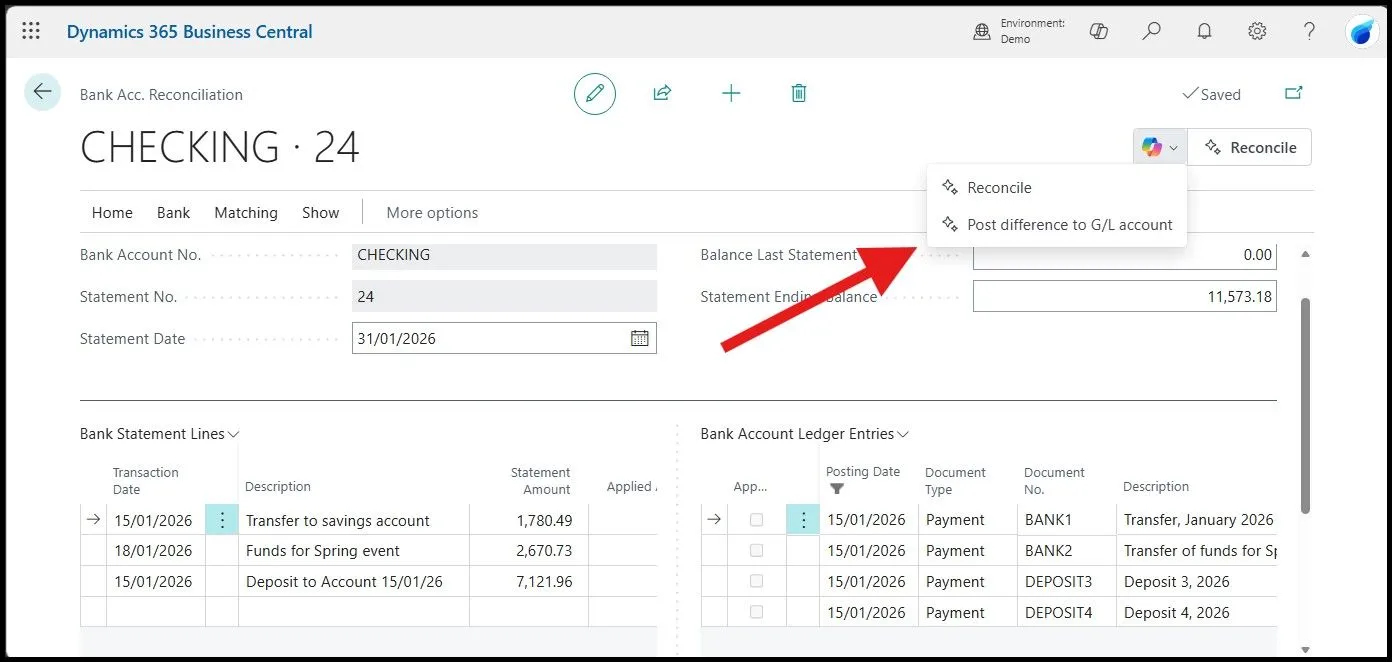
Importing a bank statement into Business Central
A new reconciliation starts from Bank Account Reconciliations > New. Pick the bank account, enter the Statement Date, and enter the Statement Ending Balance from the bank. The right pane fills with the bank account ledger entries up to the statement date. The left pane stays empty until you populate it.
There are three ways to populate the left pane.
- Import a bank statement file. Use the Import Bank Statement action. BC supports CAMT files natively. For CSV, you need a bank statement file format defined first via the Set up a bank statement file format assisted setup on the Bank Account card. Map each column in your CSV to the relevant field on the Bank Acc. Reconciliation Line table (table 274). Once the format is mapped to the bank account, every future import for that account uses it.
- Use a bank feed. Business Central ships with the Envestnet Yodlee Bank Feeds service, which links a Bank Account card to an online bank account and pulls transactions automatically. Yodlee coverage is US-focused. UK and EU implementations need a different approach because of different regulatory requirements. Yavrio is a common choice on UK and EU Business Central implementations.
- Use Suggest Lines. This action fills the left pane with invoices in BC that have outstanding payments, not from the bank. Use it when there is no file to import, and you want BC to propose what the statement should contain.
How automatic matching works in Business Central
Once the left pane is populated, choose Match Automatically. BC compares each bank statement line to bank account ledger entries on text, amount, and posting date within the tolerance you set. Matched lines and entries turn bold green.
Lines matched on a different open reconciliation show italic blue. Anything still unmatched stays black.
The Transaction Date Tolerance (Days) field controls how far BC will look before and after the bank account ledger entry posting date for a date match. Zero or blank means an exact date match only. Set this to a small number of days to absorb the lag between BC posting date and bank cleared date.
Automatic and manual matching can be combined. Manual matches made before running Match Automatically are preserved.
The current AI-powered layer is the Reconcile with Copilot action (preview). Copilot inspects the transactions that automatic matching could not handle and proposes additional matches based on dates, amounts, and descriptions.
For residual transactions with no ledger entry at all, Copilot suggests a G/L account based on the transaction description. Every Copilot proposal needs a user to accept it before it is saved.
Treat it as an extra pass after Match Automatically, not as a replacement for review.
Handling unmatched transactions before finalising the reconciliation
A bank reconciliation cannot be posted while any line still has a value in the Difference field. The Sum of Differences must be zero, which the Test Report checks.
If lines don’t match, check the following:
- A bank line with no corresponding ledger entry. Bank fees, interest charges, FX adjustments, and direct debits processed by the bank without a BC posting all fall here. Use the Transfer to General Journal action: it generates a journal line for each unmatched bank line and takes you to the general journal. Complete the line with the balancing account, post, and BC returns you to the reconciliation with the new ledger entry matched. If your organisation runs approval workflows on general journals, the posting goes through that queue first.
- A ledger entry with no corresponding bank line. A cheque posted in BC but not yet cleared at the bank is the standard example. These stay on the reconciliation as outstanding items and roll forward to the next period. The Test Report lists them separately as Outstanding Checks and Outstanding Bank Transactions.
- A line and an entry that should match, but don’t. Usually, a customer’s name is typed differently or with a small difference. Manually match the two using Match Manually. If the amount is genuinely different, post the difference to the relevant G/L account before matching; the reconciliation will not post.
If you spot a problem after posting, the Undo action on the Bank Account Statement List moves the posted statement back as an open reconciliation for rework.
If you are planning a Business Central go-live and want finance users running the close cleanly from month one, check our Corporate Training Services.
Sources
- Microsoft Learn: Reconcile bank accounts.
- Microsoft Learn: Reconcile bank accounts with Copilot (preview)
- Kristen Hosman, MVP: Processing Bank Account Reconciliations in Microsoft Dynamics 365 Business Central