Microsoft Entra ID for Dynamics 365: A Beginner's Guide
Entra is Microsoft’s identity management platform which helps admins control who can sign in to Dynamics 365 and what other applications or environments users can access. In this article, I’ll explain the core concepts you must know if you work with Microsoft Dynamics 365 applications.
Author’s Note: Some links in this post are affiliate links. If you sign up through them, we earn a small commission. It doesn’t change what you pay, and I only link to tools I’d recommend anyway.
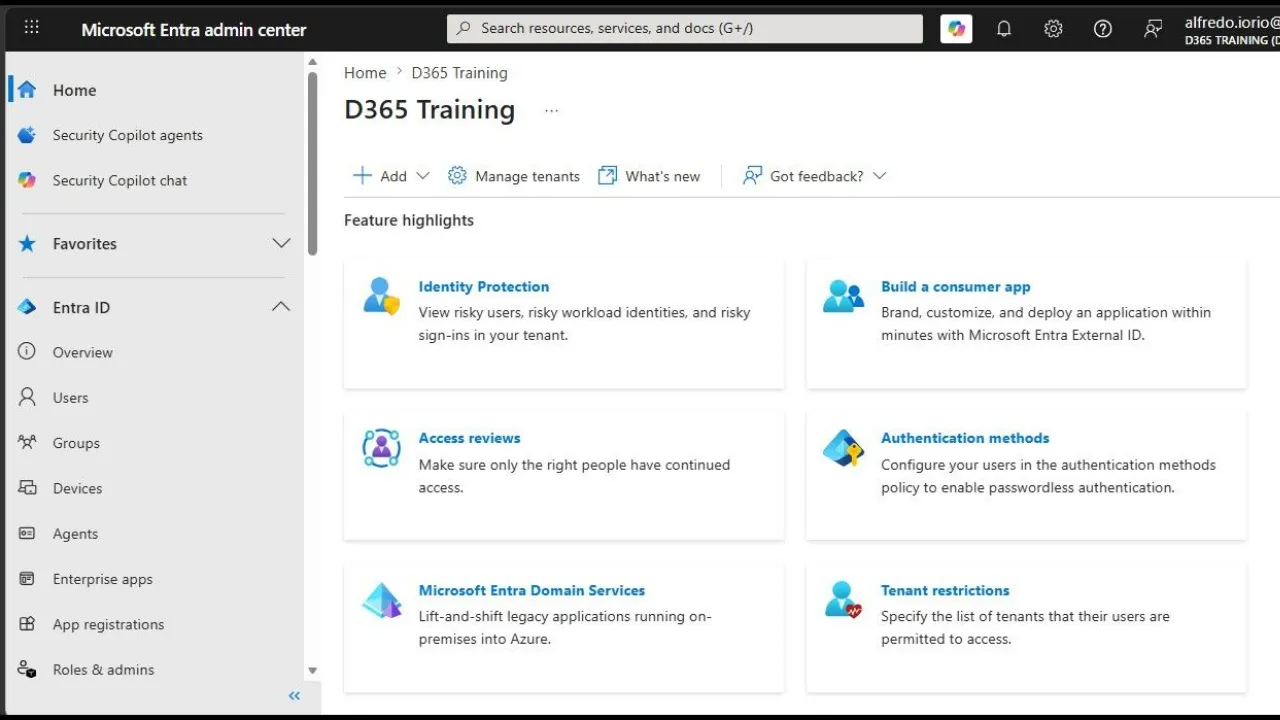
What is Microsoft Entra ID
Microsoft Entra ID (formerly known as Azure Active Directory) is Microsoft’s identity and access platform which includes many services; most of which you don’t need to know unless you are a system administrator responsible for your organisation’s identity and access management. If you are taking AZ-900, Entra ID is one of the topics. See AZ-900 exam topics.
If you work with Microsoft Dynamics apps, you only need to know these services: sign-in, security and access management to cloud applications.
Entra services you must know
- Single Sign-On (SSO): With SSO, users can use one set of credentials to access all their apps. You probably use SSO every day without even noticing it. If you can sign in to Dynamics 365 Sales and your Outlook using the same credentials, that’s because your organisation has enabled SSO.
- Multi-Factor Authentication (MFA): For enterprise-level security, Entra allows admins to enable MFA which adds a second step when you try to authenticate and log in to your favourite app. The first step is your password, and the second can be a notification on your phone or a text message.
- Conditional Access: With conditional access, admins set up rules that block access to apps or environments when certain conditions are met. For example, a device-compliance rule can block sign-in from an outdated browser or a laptop running an old operating system.
- Security groups: Probably the service that affects Dynamics users the most; security groups in Microsoft Entra ID allow you to automatically assign roles, access policies and even default licences to users by assigning them to a Security Group.
While some Dynamics 365 apps allow you to link permissions or privileges to Security Groups, these groups do not control what users can do once they have logged in, only whether they can log in.
How Microsoft Entra and Dynamics 365 Apps work together
Entra ID uses Security Groups to determine if a user can log into the environment or app they want to use. For Dynamics 365 CE and F&O, these are Power Platform environments, while for Business Central, the link is with Business Central environments managed via the dedicated Business Central admin centre.
Entra verifies the combination of user details including their licences, role, security groups and conditional access before granting access to the user. Any changes in Entra are typically applied in real-time.
What admins can do with Entra
Administrators can use Microsoft Entra ID to speed up user onboarding and add capabilities to Dynamics applications.
- Automate user provisioning: Licences can be assigned to security groups so new employees can get the right access to all the apps they need in just a few clicks. Further automation between HR software and Entra can even automate the whole process.
- Centralised Authentication for B2B/B2C portals: Companies that use Dynamics 365 Commerce, or Power Pages portals can use centralised authentication instead of creating local portal credentials, external users log in via secure tokens issued by Microsoft Entra External ID.
- Secure data pipelines: Entra acts as the central identity provider for Dynamics 365 data pipelines, so only authenticated services and applications can access or transfer data between Dynamics 365 and analytics tools such as Azure Data Factory and Azure Synapse.
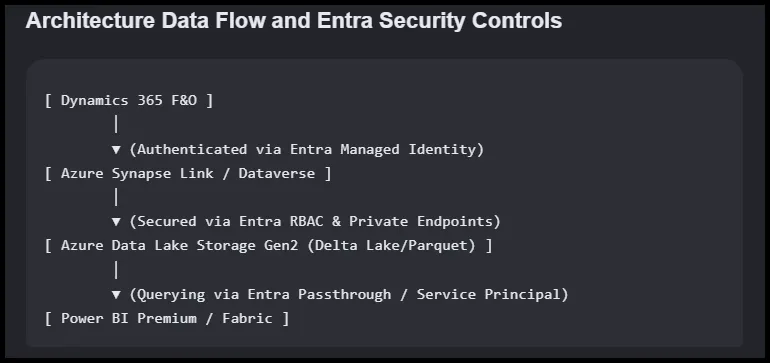
- API permissions: When other applications need to authenticate and send data to Dynamics apps, admins can use Entra ID to secure application-level security. For example, when a customer places an order on an external e-commerce shop, a back-end server uses Entra ID authentication to push orders into Dynamics 365 without storing passwords in a middle-tier server.
Differences between the Microsoft 365 admin center and the Microsoft Entra admin center
The Microsoft 365 admin center manages users, licences, and services across the organisation tenant. The Microsoft Entra admin center handles identity: sign-in policies, conditional access, and app registrations.
Think in these terms: Entra is the organisation directory, the place where admins create and maintain identity and access management infrastructure of the organisation. The Microsoft 365 admin center sits on top of Entra, and it’s where Microsoft 365 admins manage daily operations.
Can you have Microsoft Entra and not have Microsoft 365?
Entra can exist without Microsoft 365: For example, you can create and manage an Entra ID tenant for one organisation without any Microsoft 365 licences.
Entra can serve as the central identity hub for companies regardless of the productivity suite in use. Your organisation can maintain a SAP ERP and Google Workspace for emails and cloud storage while using Entra for access control, security, and integration orchestration with other Microsoft services.
What Dynamics 365 users and consultants must learn about Entra ID
Consultants need to know how Entra governs access to Dynamics 365. That means user provisioning, security groups, conditional access, and the app registrations behind integrations.
Most companies that implement Microsoft Dynamics 365 apps take identity management and security seriously, and often use more applications across different environments and even tenants. In this case, your knowledge of how Entra controls identity, access management, data pipelines and APIs is a skill that will help you boost your career as a user or a consultant.
Entra admin vs Dynamics 365 admin: roles and differences explained
In medium to large organisations, an Entra admin manages tenant identity: users, groups, and sign-in policies. A Dynamics 365 admin manages the application: environments, security roles, and business data.
The two admin centres serve different purposes.
| Feature/Aspect | Microsoft Entra ID Admin | Dynamics 365 Admin |
|---|---|---|
| Primary function | Identity, access management, directory-wide roles. | Dynamics 365 applications and environments |
| Access Level | Tenant-wide or scoped via Administrative Units | Limited to Dynamics 365 instances; cannot create tenant users or assign subscriptions |
| Instance & App Management | No | Full within the assigned Dynamics 365 environment and role |
| Best for | IT admins, identity managers, security governance | Business admins, application owners, environment managers |
In essence, a Microsoft Entra administrator working for a medium-size business controls identities, licences, access, and role assignments across all Microsoft 365 (and non-Microsoft) services.
A Dynamics 365 administrator focuses on managing Dynamics 365 environments, privileges and permissions, Dynamics applications and extensions, and provides operational support for Dynamics users.
Learning paths and certifications for Entra ID
On Microsoft Learn, Microsoft Entra ID sits under its own dedicated category called Microsoft Security, Compliance, and Identity (SCI), rather than under Azure.
There are five certifications for this path:
- SC-900: Microsoft Certified: Security, Compliance, and Identity Fundamentals
- SC-200: Microsoft Certified: Security Operations Analyst Associate
- SC-300: Microsoft Certified: Identity and Access Administrator Associate
- SC-401: Microsoft Certified: Information Security Administrator Associate
- SC-100: Microsoft Certified: Cybersecurity Architect Expert
If you use Dynamics applications every day, the SC-900 is more than sufficient to enhance your skills in Microsoft security. For consultants, I recommend going for the SC-200 and possibly the SC-300 if your goal is to become a lead consultant or solution architect. For those who want a career in cybersecurity, the SC-100 is the goal.